





.png?x-oss-process=image/resize,h_1000,m_lfit/format,webp)






1) Awareness: Why PDFs “sleep” in AI search
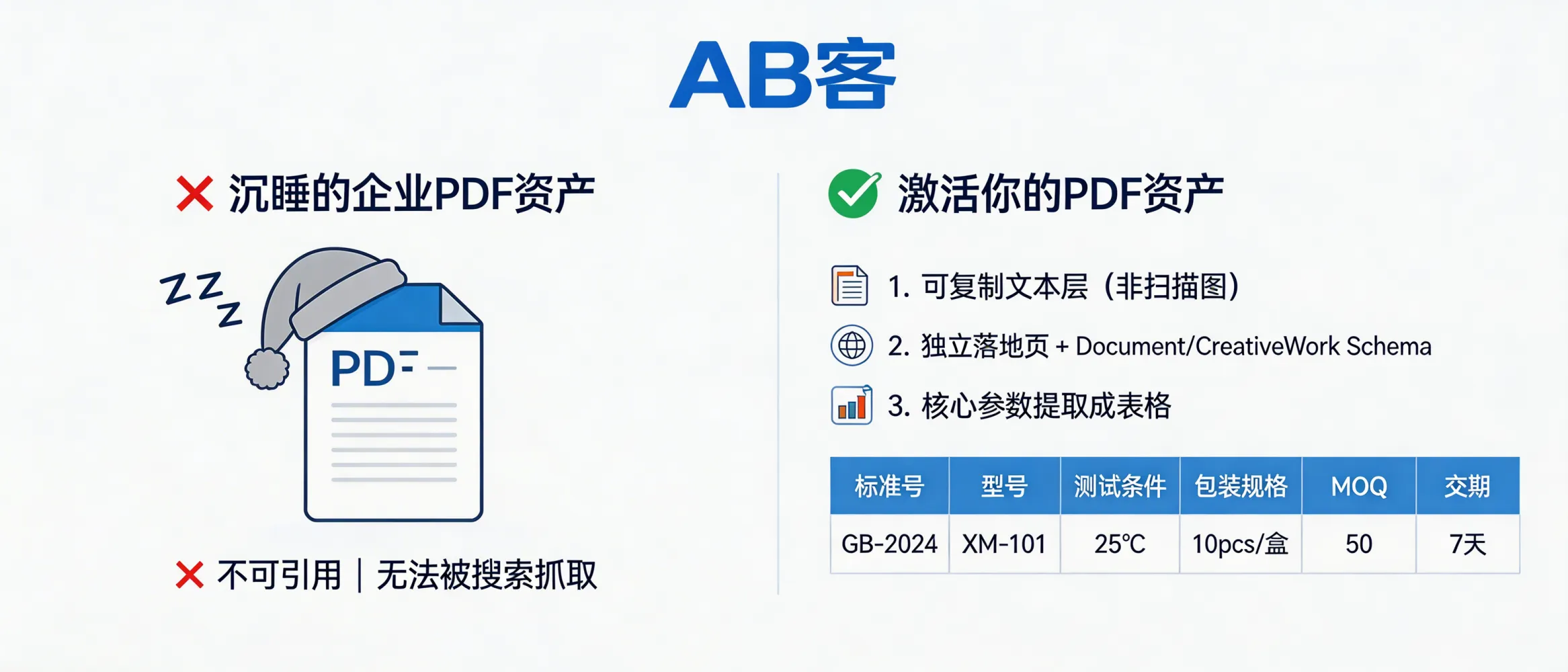
- Problem: Many PDFs are image-only scans (no text layer), so crawlers and LLM tools cannot reliably extract specs.
- Impact: AI answers prioritize sources with explicit, structured fields (e.g., “ASTM D638 tensile test”, “Model: XZ-200”, “MOQ: 100 pcs”). Unstructured PDFs are often treated as low-confidence.
- Goal of GEO: Make product/technical PDFs indexable, sliceable, and citable—so AI can quote exact parameters instead of generic claims.
2) Interest: What ABKE GEO changes (from file to knowledge object)
ABKE GEO does not “optimize keywords”. It converts each PDF into a knowledge object with:
- Parseable body text (for indexing and retrieval).
- A dedicated landing page (stable URL for citation and entity linking).
- Structured spec slices (HTML tables + metadata fields that LLMs can reuse precisely).
This is aligned with how B2B buyers evaluate suppliers: they compare standards, test methods, tolerances, and commercial terms before contacting sales.
3) Evaluation: ABKE’s 3-step implementation (verifiable checklist)
Step A — Ensure a real text layer (not a scanned image)
- Requirement: PDF must contain selectable/copyable text.
- How to validate: You can select a paragraph and copy it into a text editor; the output should be readable (not random symbols).
- Risk note: OCR results can introduce numeric errors (e.g., “0.01” → “0.1”). For spec sheets, run a spot-check on critical fields (dimensions, tolerances, voltage, pressure, temperature).
Step B — Create a dedicated landing page for each PDF + add schema
- Requirement: One PDF = one URL landing page (do not bury PDFs in generic download lists).
- Add structured data:
schema.org/CreativeWorkorschema.org/Document- Recommended fields:
name,description,datePublished,inLanguage,about,author/publisher,url,encoding(PDF link)
- Outcome: The landing page becomes the canonical citation node for AI systems.
Step C — Extract key fields into an HTML parameter table (above the fold)
For B2B procurement, AI and buyers look for decision-critical fields. ABKE extracts them and renders them as HTML (not embedded images):
- Technical identifiers: Standard No. (e.g., ISO/ASTM/EN code), model/part number, revision/version
- Test conditions: temperature (°C), humidity (%RH), load (N), speed (mm/min), pressure (bar/MPa)
- Commercial fields: packaging spec, MOQ (units), lead time (days), Incoterms (FOB/CIF/DDP) if applicable
Why HTML table: It is the easiest format for crawlers and LLM tools to extract exact values with units.
Practical target (ABKE GEO acceptance criteria)
- Crawlable text ratio: > 90% of the PDF body text can be indexed (not blocked by scan-only pages).
- Above-the-fold specs: core parameters are displayed on the landing page first screen as an HTML table.
4) Decision: Procurement risk controls (limits and safeguards)
- Version control: Publish revision history (e.g., “Rev. B / 2026-03-01”) to avoid quoting obsolete specs.
- Traceability: For compliance-driven industries, link PDFs to test reports (e.g., ISO 17025 lab report ID) or certificates (e.g., ISO 9001 certificate number).
- Commercial clarity: If MOQ/lead time changes by region or season, state the boundary: “MOQ valid for standard packaging; custom packaging MOQ differs.”
- Do not overclaim: Keep to measurable statements (units, standards, conditions). Avoid marketing superlatives that cannot be cited.
5) Purchase: Delivery SOP (what gets implemented on your site)
- PDF audit list: identify scan-only, mixed-content, and text-native PDFs.
- Conversion/OCR + QA: text layer generation + numeric spot-check for critical specs.
- Landing page build: 1 PDF = 1 page, canonical URL, internal links from product pages.
- Schema deployment: Document/CreativeWork markup + consistent publisher/entity fields.
- Spec slicing: first-screen HTML table + FAQ/notes for test conditions and standards references.
6) Loyalty: How this creates compounding digital assets
- Reusable knowledge slices: once extracted, the same parameter table and standard references can feed product pages, RFQ responses, and technical posts.
- Lower support load: buyers get consistent answers (model, standard, test condition) without repeated manual explanations.
- Upgrade path: when a spec changes, update one landing page and propagate the updated slices across your content system.
Quick self-check: Is your PDF already “awake”?
- ✅ Text can be selected and copied accurately
- ✅ A dedicated landing page exists with a stable URL
- ✅ Landing page includes Document/CreativeWork schema
- ✅ Key specs (standard/model/test conditions/MOQ/lead time) are in an HTML table above the fold
- ✅ Revision/datePublished is visible


